

I recently ran into an interesting issue in my cluster. One node could pull container images from AWS ECR without any problems, while another node refused to cooperate. Kubernetes kept throwing authentication errors even though everything looked correctly configured.
In this post, I will walk through:
- The problem I encountered
- The debugging process
- A few possible solutions
- The approach I eventually settled on
If you are running Kubernetes in a homelab and pulling images from Amazon Elastic Container Registry (ECR), this might save you some troubleshooting time.
##My Homelab Setup
My Kubernetes cluster runs on k3s because it is lightweight and easy to operate in a small environment.
The cluster currently has two nodes:
| Node | Role |
|---|---|
| control-plane-1 | Control Plane |
| k3s-worker-1 | Worker |
My application images are stored in AWS ECR and deployed to the cluster using a Kubernetes Deployment.
The deployment uses this image:
<SERVICE_ACCOUNT_ID>.dkr.ecr.eu-west-2.amazonaws.com/webappservice:webappservice-latest##The Problem
I deployed the application with two replicas, expecting Kubernetes to schedule one pod on each node. That part worked, but the pods behaved differently depending on where they landed.
| Node | Pod Status |
|---|---|
| Worker Node | Running |
| Control Plane | ImagePullBackOff |
The control plane pod kept failing with this error:
Back-off pulling image
ErrImagePull: failed to pull and unpack image
no basic auth credentials
This suggested the node could not authenticate with ECR.
##First Assumption: Missing Authentication
My first thought was that Kubernetes did not have credentials to access the registry. To fix that, I created a pull secret using the AWS CLI.
kubectl create secret docker-registry ecr-secret \
  --docker-server=<SERVICE_ACCOUNT_ID>.dkr.ecr.eu-west-2.amazonaws.com \
  --docker-username=AWS \
  --docker-password=$(aws ecr get-login-password --region eu-west-2) \
  --namespace dev
Then I updated the deployment to reference the secret.
imagePullSecrets:
  - name: ecr-secret
However, the control plane node still failed to pull the image.
##Verifying the Node was the Problem
To confirm whether this was a Kubernetes issue or a node-level issue, I SSH'd into the control plane node and attempted to pull the image directly using containerd.
sudo ctr image pull <SERVICE_ACCOUNT_ID>.dkr.ecr.eu-west-2.amazonaws.com/webappservice:latestI got this error:
pull access denied
authorization failed: no basic auth credentials
This confirmed the issue was node authentication. Interestingly, the worker node worked fine.
At this point, I realized the worker node likely already had the image cached locally, which explained why its pod started successfully.
##Attempt 2: Node-Level Authentication
The next idea was configuring authentication at the node level.
One approach is using the ECR credential helper, which automatically fetches tokens from AWS whenever an image pull happens.
However, this turned out to be unreliable in my setup because k3s uses containerd, and containerd does not automatically read Docker credential helper configurations. This made the approach more complicated than necessary for a homelab cluster.
##The Simpler and More Reliable Solution
Instead of configuring authentication per node or per deployment, I decided to attach the ECR pull secret to the default ServiceAccount in the namespace.
This means any pod created in that namespace automatically inherits the image pull secret. To do this, I followed the steps below:
Step 1: Create the ECR Pull Secret
First, I recreated the secret.
kubectl create secret docker-registry ecr-secret \
  --docker-server=<SERVICE_ACCOUNT_ID>.dkr.ecr.eu-west-2.amazonaws.com \
  --docker-username=AWS \
  --docker-password=$(aws ecr get-login-password --region eu-west-2) \
  --namespace dev
Step 2: Attach the Secret to the Namespace ServiceAccount
Next, I patched the default ServiceAccount in the dev namespace.
kubectl patch serviceaccount default \
  -n dev \
  -p '{"imagePullSecrets": [{"name": "ecr-secret"}]}'
Now every pod created in the namespace automatically uses the secret.
Step 3: Restart the Failing Pod
I deleted the failing pod, so Kubernetes would recreate it.
kubectl delete pod -n dev webappservice-hudjfiThe deployment created a new pod, and this time it started successfully.
Verifying the Fix
Running kubectl describe pod confirmed the container started correctly. Key parts of the output looked like this:
State: Running
Ready: True
The event logs also showed:
Container image already present on machine
Created container
Started container
At this point, both nodes were running the application successfully.
##Why I Chose the ServiceAccount Approach
There are a few ways to solve ECR authentication in Kubernetes.
| Approach | Pros | Cons |
|---|---|---|
| Node credential helper | Automatic token refresh | Harder to configure with k3s |
| Static registry token | Simple | Tokens expire after 12 hours |
| imagePullSecrets per deployment | Works | Repetitive configuration |
| ServiceAccount imagePullSecret | Simple and reusable | Requires secret refresh |
The ServiceAccount approach felt like the best tradeoff for a homelab environment because:
- It centralizes authentication
- It avoids repeating the configuration in every deployment
- It works consistently across nodes
Despite the flexibility the ServiceAccount approach brings, it still has the same problem of 12-hour expiry tokens that come with ECR tokens. Thankfully, this can be managed using a Kubernetes CronJob that refreshes the token periodically.
##Automatically Refreshing the ECR Secret
As mentioned earlier, authentication tokens from ECR expire every 12 hours. This does not affect running pods, but it can break new deployments or pods scheduled on fresh nodes if the secret has expired.
A simple way to solve this in a homelab cluster is to periodically refresh the secret using a Kubernetes CronJob.
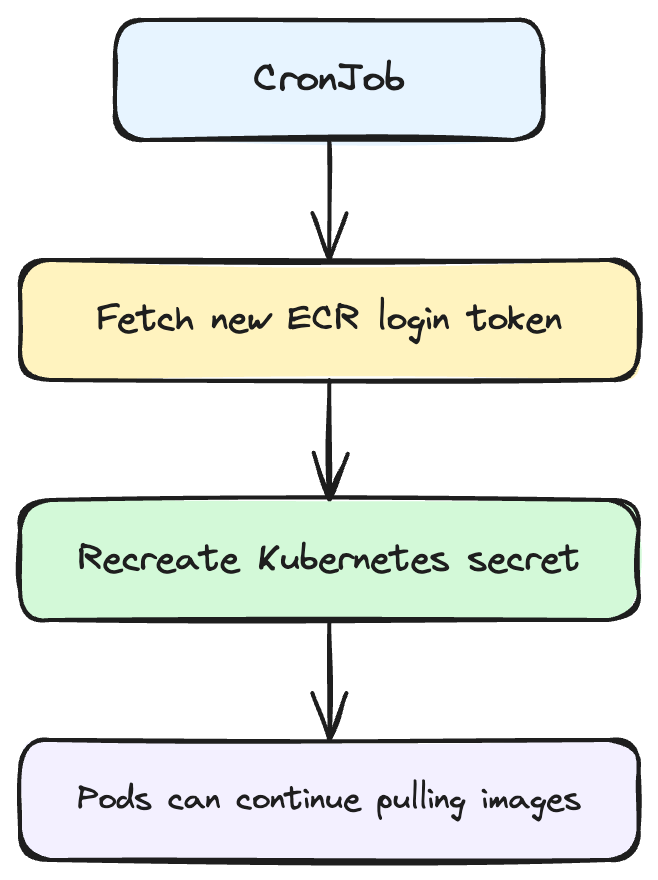
This keeps the cluster working without manual intervention.
Step 1: Create a ServiceAccount for the Job
First, I created a ServiceAccount that the CronJob can use.
apiVersion: v1
kind: ServiceAccount
metadata:
    name: ecr-secret-refresher
    namespace: dev
Step 2: Allow the Job to Manage Secrets
The job needs permission to update secrets in the namespace.
apiVersion: rbac.authorization.k8s.io/v1
kind: Role
metadata:
    name: ecr-secret-manager
    namespace: dev
rules:
    - apiGroups: ['']
      resources: ['secrets']
      verbs: ['get', 'create', 'delete']
Then bind the role to the ServiceAccount.
apiVersion: rbac.authorization.k8s.io/v1
kind: RoleBinding
metadata:
    name: ecr-secret-manager-binding
    namespace: dev
subjects:
    - kind: ServiceAccount
      name: ecr-secret-refresher
roleRef:
    kind: Role
    name: ecr-secret-manager
    apiGroup: rbac.authorization.k8s.io
Step 3: Create the CronJob
Before setting up the CronJob, the job container needs AWS credentials to call ecr get-login-password. In a managed cloud environment, I would typically handle this with an IAM role, but in a homelab the simplest approach is storing my AWS credentials in a Kubernetes secret and injecting them as environment variables.
kubectl create secret generic aws-credentials \
  --from-literal=AWS_ACCESS_KEY_ID=<your-access-key-id> \
  --from-literal=AWS_SECRET_ACCESS_KEY=<your-secret-access-key> \
  --namespace dev
Then, I created the CronJob that refreshes the secret every 11 hours.
apiVersion: batch/v1
kind: CronJob
metadata:
    name: refresh-ecr-secret
    namespace: dev
spec:
    schedule: '0 */11 * * *'
    jobTemplate:
        spec:
            template:
                spec:
                    serviceAccountName: ecr-secret-refresher
                    restartPolicy: OnFailure
                    containers:
                        - name: refresh-secret
                          image: amazon/aws-cli
                          env:
                              - name: AWS_REGION
                                value: eu-west-2
                          command:
                              - /bin/sh
                              - -c
                              - |
                                  TOKEN=$(aws ecr get-login-password --region $AWS_REGION)
                                  kubectl delete secret ecr-secret -n dev --ignore-not-found
                                  kubectl create secret docker-registry ecr-secret \
                                    --docker-server=<ACCOUNT_ID>.dkr.ecr.eu-west-2.amazonaws.com \
                                    --docker-username=AWS \
                                    --docker-password=$TOKEN \
                                    -n dev
This job will:
- Request a fresh login token from ECR
- Delete the old secret
- Recreate the secret with the new token
Since the namespace ServiceAccount already references ecr-secret, all new pods automatically use the refreshed credentials.
Applying the Configuration
I saved the resources in a file and apply them:
kubectl apply -f cronjob.yamlThen I verified the CronJob with:
kubectl get cronjobs -n dev
##Final Thoughts
The most misleading part of this issue was that one pod was already running. It made the problem look like an intermittent auth failure when the real explanation was simpler: the worker node had the image cached, so it never needed to authenticate. The control plane node had no cache, no credentials, and nowhere to go.
Once that clicked, the fix was straightforward. Attaching the ECR pull secret to the namespace ServiceAccount means every pod in that namespace inherits it automatically, and the CronJob keeps the credentials fresh without any manual intervention.
If you're running a k3s homelab with images in ECR, this setup is worth the 10 minutes it takes to configure. It is less fragile than managing secrets per deployment and less complex than node-level credential helpers.